
Changing wheels
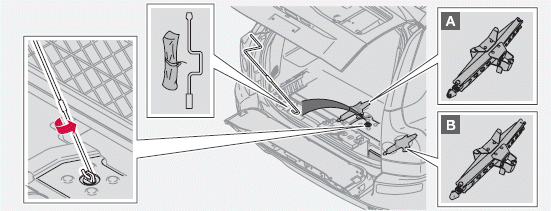
Jack location
See also:
General information
Location of the side impact (SIPS) airbags (front
seats only)
As an enhancement to the structural side
impact protection built into your vehicle, it is
also equipped with Side Impact Protectio ...
Limitations
Even if a fairly small section of the screen image
appears to be obstructed, this may mean that
a relatively large area behind the vehicle is hidden
and objects there may not be detected
until ...
Pairing and connecting an external device
Before an external device can be connected, it
must be paired to the infotainment system. The
procedure for connecting an external device
varies, depending whether or not the device
has previo ...