
Brake fluid

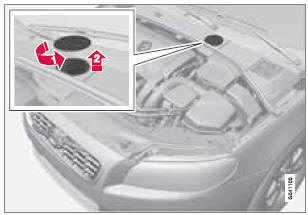
Location of the brake fluid reservoir
Checking the level
The fluid reservoir is concealed under the round cover at the rear of the engine compartment. The round cover must be removed first before the reservoir cap can be accessed.
The brake fluid should always be between the MIN and MAX marks on the inside of the reservoir. Check, without removing the cap, that there is sufficient fluid in the reservoir.
Fluid type: DOT 4+ boiling point >536 °F (>280 °C), P/N 9437433
Replace: The fluid should be replaced according to the intervals specified in the Warranty and Service Records Information booklet.
When driving under extremely hard conditions (mountain driving, etc), it may be necessary to replace the fluid more often. Consult a trained and qualified Volvo service technician.
Always entrust brake fluid changing to a trained and qualified Volvo service technician.
 WARNING
- If the fluid level is below the MIN mark in the reservoir or if a brake-related message is shown in the information display: DO NOT DRIVE. Have the car towed to a trained and qualified Volvo service technician and have the brake system inspected.
- Dot 4+ should never be mixed with any other type of brake fluid.
Filling
1. Turn and open the cover.
2. Unscrew the reservoir cap and fill the fluid. The level must be between the MIN and MAX marks.
See also:
Child safety
A passenger airbag cut off switch is available to enable a child seat to be
carried in the front of the car, while, in the rear, Volvo has also paid special
attention to child safety.
Two integr ...
Tailgate wiper/washer
A section of the switch
O Neutral position: The wiper is switched
off
B Normal (continuous) wiping: Press the
lower section of the switch
Move the lever forward to start the tailgate
washer. A ...
Functions
NOTE
If a warning message appears while you are
using the trip computer, this message must
be acknowledged in order to return to the
trip computer function. Acknowledge a
message by pressing ...