
Unique functions—PCC*

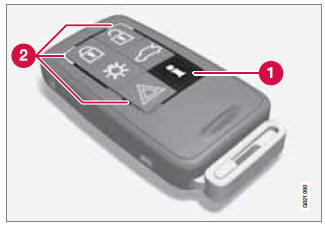
1 - Information button
2 - Indicator lights
Pressing the information button provides certain information about the vehicle with the help of the indicator lights.
See also:
FAV—storing a shortcut
The FAV button can be used to store frequently
used functions, making it possible to start the
stored function by simply pressing FAV. One
favorite (for example, Equalizer) can be programmed
...
Removing the headlight housing
1. Switch off the ignition by briefly pressing
the START/STOP ENGINE button.
2. Remove the remote key from the ignition
slot1.
3. (Upper illustration under "Headlight housing").
&nb ...
Using voice commands
The driver initiates a voice command dialogue
by pressing the voice control button (see the
illustration on page 241).
When a dialogue has been initiated, commonly
used commands will be shown i ...