
Operation

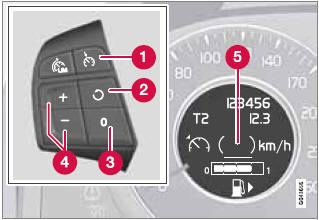
Steering wheel-mounted controls and display
1 Standby mode
2 Resume set speed
3 Deactivating
4 Activate/set speed
5 Set speed indicator (parentheses indicate standby mode)
See also:
Using HomeLink
To operate, simply press and release the programmed
HomeLink button. Activation will
now occur for the trained device (i.e., garage
door opener, gate operator, security system,
entry door lock ...
Glove compartment
The glove compartment can only be locked and unlocked using the detachable key
blade in the remote key. See page 59 for information on removing the key blade from
the remote key.
Insert the ke ...
Under the Hood
A 2.4-liter inline-five-cylinder produces 168 horsepower in the base wagon.
The high-performance T5 holds a turbocharged 2.5-liter five-cylinder that
generates 218 hp and 236 pounds-feet of torque ...