

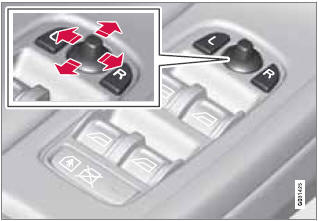
Power door mirrors

Power door mirrors  - Mirrors - Your driving environment - Volvo XC60 Owners Manual - Volvo XC60

Door mirror controls

See also:

Day/Night mode
The screens can be set for three different lighting conditions: Auto, Day or Night. Press on the remote control and change the setting under Day/Night mode on the screen. See also page 251 f ...

Continued
This symbol can be found at the lower right corner of an odd-numbered (right-hand) page to indicate that the current topic is continued on the following page. ...

Introduction
The menu system provides access to menus for operating many of the vehicle's functions, such as setting the clock, door mirrors, locks, etc. Navigating in the menus is done using the buttons ...