
Top tether anchors

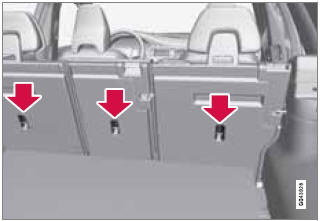
Child restraint anchorages
Your Volvo is equipped with child restraint top tether anchorages in the rear seat. They are located on the rear side of the backrests.
Securing a child seat
1. Place the child restraint on the rear seat.
2. Route the top tether strap under the head restraint and attach it to the anchor.
3. Attach lower tether straps to the lower ISOFIX/ LATCH anchors. If the child restraint is not equipped with lower tether straps, or the restraint is used in the center seating position, follow instructions for securing a child restraint using the Automatic Locking Retractor seat belt (see page 38).
4. Firmly tension all straps.
Refer also to the child seat manufacturer's instructions for information on securing the child seat.
NOTE
On models equipped with the optional
cargo area cover, this cover should be
removed before a child seat is attached to
the child restraint anchors.
WARNING
• Never route a top tether strap over the
top of the head restraint. The strap
should be routed beneath the head
restraint.
• Child restraint anchorages are designed
to withstand only those loads imposed
by correctly fitted child restraints. Under
no circumstances are they to be used
for adult seat belts or harnesses. The
anchorages are not able to withstand
excessive forces on them in the event of
collision if full harness seat belts or adult
seat belts are installed to them. An adult
who uses a belt anchored in a child
restraint anchorage runs a great risk of
suffering severe injuries should a collision
occur.
• Do not install rear speakers that require
the removal of the top tether anchors or
interfere with the proper use of the top
tether strap.
See also:
Cargo area lighting
NOTE
Before starting to replace a bulb, see
page 322.
1. Insert a screwdriver and gently turn so that
the bulb housing comes loose.
2. Replace the bulb.
3. Check that the bulb illuminates an ...
Using an integrated booster cushion
Stage 1
1 Pull the handle (1) forward and upward (2)
to release the booster cushion.
2 Press the booster cushion rearward to lock
it in position.
Stage 2
1 With the booster cushion in ...
The Looks
The improvements over the previous generation are of course most noticeable
by simply looking at the S80. I wouldn't call it striking, but it is handsome —
bordering on the masculine, yet still ab ...