
Replacing batteries in the remotecontrol and cordless headphones

The remote control and headphones each run on 2 AAA batteries.
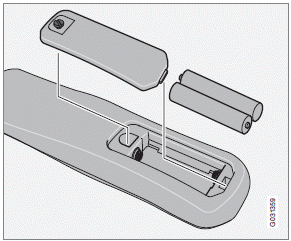
Remote control
1. Remove the retaining screw and lift off the
battery cover.
2. Remove the old batteries and insert new
ones as indicated by the symbols in the
battery compartment.
3. Replace the battery cover and tighten the
retaining screw.
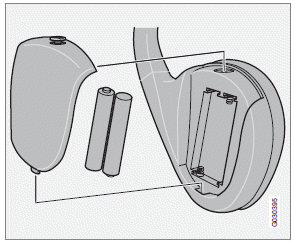
Cordless headphones
1. Remove the retaining screw and lift off the
battery cover.
2. Remove the old batteries and insert new
ones as indicated by the symbols in the
battery compartment.
3. Replace the battery cover and tighten the
retaining screw.
NOTE
If the temperature in the passenger compartment
is high (e.g., if the car has been
parked in the sun for a prolonged period) or
if the batteries in the remote or headphones
are weak, a message will appear on the RSE
screens.
Concern for the environment
Used batteries should be disposed of properly (e.g., at a recycling facility, etc).
See also:
Power windows
The power windows are controlled by buttons
in the arm rests. The ignition switch must be
ON1 (ignition key in position I, II or the engine
running) for the electrically operated windows
to functi ...
Guiding lines
The lines on the screen are projected as if they
were a path on the ground behind the vehicle
and are affected by the way in which the steering
wheel is turned. This enables the driver to
se ...
From outside the vehicle
The remote key locks and unlocks all of the doors and the trunk.
Before the vehicle can be locked from the outside with the remote key, the driver's
door must be closed. Any other door/trunk th ...