
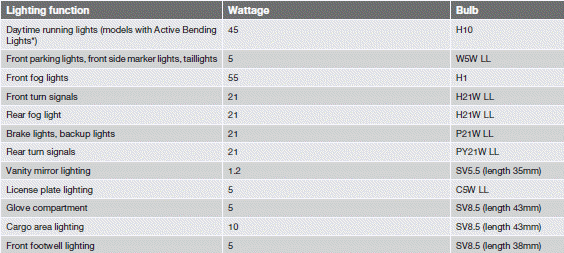
Bulb specifications


NOTE
Please consult a Volvo retailer’s Parts
department for the most up-to-date specifications.
See also:
Introduction
Certain models are equipped with a tire sealing
system that enables you to temporarily seal a
hole in the tread surface and re-inflate a flat tire,
or to adjust a tire’s inflation pressure.
The ...
Accessory installation
We strongly recommend that Volvo owners install only genuine, Volvo-approved
accessories, and that accessory installations be performed only by a trained
and qualified Volvo service technicia ...
Tire age
Tires degrade over time, even when they are not being used. It is recommended
that tires generally be replaced after 6 years of normal service. Heat caused by
hot climates, frequent high loading c ...