
Center console buttons

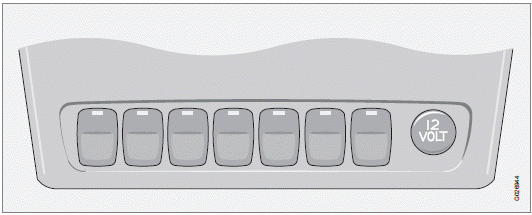
Active Bending Lights

The beams of these headlights adjust laterally to help light up a curve according to movements of the steering wheel when the vehicle is turning. This function is activated automatically when the engine is started and can be deactivated/ reactivated by pressing the button. The indicator light in the button is on when the function is activated.

This button controls the optional rear seat air conditioning system.

Press the button and release it to fold the door mirrors in or out. On certain models, when the button is pressed, there may be a long pause before the mirrors move. Pressing the button again during this pause may erase your first button press. If this happens, wait ten seconds and press the button one more time.
The mirrors cannot be adjusted during the first ten seconds after they have been folded out.
NOTE
If the door mirrors have been inadvertently
pushed out of position (in a car wash, parking
lot, etc.) manually return them to normal
position. If mirror adjustment does not seem
to operate after manual folding, reset the
folding mirrors as follows:
• Turn the ignition key to position II.
• Manually fold the mirror(s) to the normal
position.
• Press the button to fold both mirrors in.
• Press the button again to fold the mirrors
out to their normal position.
Park Assist

This system provides an audible warning when the vehicle is being parked or if it is driven close to a person or object. For more information
NOTE
The system activates automatically when
the engine is started, and can be deactivated
by pressing this button (e.g. when
towing a trailer) or reactivated if necessary.
Auxiliary lights

This button is used to switch on auxiliary lights (if installed). A light in the button will light up to indicate that the auxiliary lights are illuminated.
12-volt sockets

The 12-volt sockets can be used to plug in certain accessories such as cell phones, etc.
The ignition key must be in position I (or higher) for the auxiliary socket to function.
The maximum current consumption is 10A (120W) if only one of the 12-volt sockets is in use. If both the front and rear sockets are used at the same time, the maximum current consumption per socket is 7.5A (90W).
NOTE
The auxiliary sockets can also be used for
cigarette lighters, which are available as
accessories at your Volvo retailer.
Power child locks

For more information on this function.
See also:
Operation
Settings are made by pressing MY CAR on the center console control panel and
using the menus displayed. ...
Removing the key blade
Slide the spring loaded
catch to the side.
Pull the key blade straight
out of the remote key. ...
Inflating tires
The tire sealing system can be used to inflate the tires. To do so:
1. Park the car in a safe place.
2. The compressor should be switched off. Ensure that the on/off switch is in
position 0 (the 0 ...