
Function

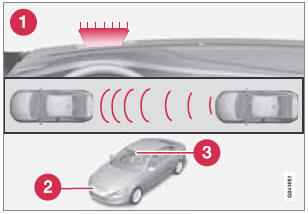
Function overview
1 - Visual warning signal, collision risk
2 - Radar sensor
3 - Camera
See also:
Child safety
WARNING
Do not use child safety seats or child booster cushions/backrests in the
front passenger's seat. We also recommend that children under 4 feet 7 inches
(140 cm) in height who ...
Driving Impressions
The gentle but capable XC90 is solid and refined and handles more like a taut
European sedan. It reacts masterfully on twisting roads and functions with
precise control.
Expect a smooth and soli ...
Reprogramming a Single HomeLink Button
To program a device to HomeLink using a
HomeLink button previously trained, follow
these steps:
1. Press and hold the desired HomeLink button.
DO NOT release the button.
2. The indicator light ...