
Queue Assist*

The following functions are linked to your vehicle's automatic transmission and comprise the Queue Assist feature.
Please note that the lowest speed that can be set is 18 mph (30 km/h), although ACC can maintain a set speed/distance to a vehicle ahead down to a standstill. Queue Assist consists of the following features:
Enhanced speed interval
Your vehicle can maintain the set time interval to the vehicle ahead at any permissible speed, including a complete stop.
In order to activate ACC at speeds below 18 mph (30 km/h):
- The vehicle ahead must be within a reasonable distance (not farther away than approx. 100 ft/30 meters)
- The lowest speed that can be selected is 18 mph (30 km/h), although ACC will also help maintain the set time interval to the vehicle ahead at lower speeds, including a complete stop.
During short stops (less than approximately 3 seconds) in slow-moving traffic, your vehicle will begin moving again automatically as soon as the vehicle ahead begins to move. If it takes more than 3 seconds for the vehicle ahead to begin moving, ACC will be automatically go into standby mode.
The driver will then have to reactivate ACC in one of the following ways:
- By pressing

- By accelerating up to at least 3 mph (4 km/h)
Your vehicle will then resume following the vehicle ahead at the set time interval.
 NOTE
NOTE
ACC can remain active and keep your vehicle at a standstill for up to 2 minutes. After 2 minutes have elapsed, the parking brake will be engaged and ACC will go into standby mode.
To reactivate ACC, the driver must release the parking brake (see page 125) and
press .
Automatic standby mode when ACC changes target vehicles
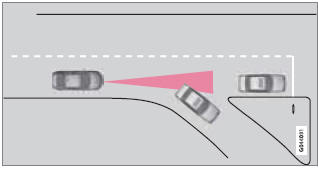
If the vehicle ahead turns suddenly, there may be a stationary vehicle ahead
The following only applies at speeds below approximately 18 mph (30 km/h):
If ACC changes target vehicles (the vehicle that the radar sensor has detected) from a moving vehicle to a stationary one, the system will apply the brakes in your vehicle.
 WARNING
At speeds above 18 mph (30 km/h), ACC will not react to a stationary vehicle and apply the brakes but will instead accelerate to the previously set speed. The driver must actively apply the brakes to stop the vehicle.
ACC disengages and goes into standby mode if:
- Your vehicle's speed goes below 10 mph (15 km/h) and ACC cannot determine if the target object is a stationary vehicle or some other type of object such as e.g., a speed bump.
- Your vehicle's speed goes below 10 mph (15 km/h) and the vehicle ahead turns so that ACC no longer has a target vehicle to follow.
No automatic braking when at a standstill
In certain situations, ACC will no longer apply the brakes and go into standby mode while the vehicle is not moving. This means that the driver will have to apply the brakes.
This happens if:
- The driver presses the brake pedal
- The parking brake is activated
- The gear selected is moved to P,N or R
- The driver presses the
 button
to put ACC in standby mode
button
to put ACC in standby mode
The parking brake is applied automatically
In certain situations, ACC will apply the parking brake in order to continue keeping the vehicle at a standstill.
This happens if:
- The driver opens the door or takes off his/her seat belt
- DSTC is put in Sport mode (see page 149)
- ACC has kept the vehicle at a standstill for more than 2 minutes
- The engine has been switched off
- The brakes have overheated
See also:
Rear window and door mirror defrosters
Use the defroster to quickly remove fog and ice from the rear window and the
door mirrors.
Press the button once to start simultaneous rear window and door mirror defrosting.
The light in the b ...
Changing a wheel
Removing a wheel
Location of jack, towing eyelet1 and tools ...
Automatic connection
When the Bluetooth function is active and the most recently paired device is
within range, it is automatically connected. When the infotainment system searches
for the most recently paired device, ...