
Removing the key blade

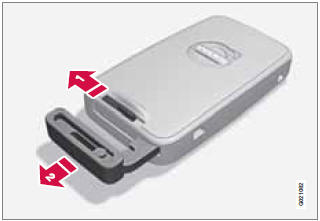
Removing the key blade
1 Slide the spring loaded catch to the side.
2 Pull the key blade straight out of the remote key.
See also:
Activating/deactivating warning signals
The collision warning system’s visual signals are activated automatically when
the engine is started if the collision warning system is switched on.
The audible warning signal can be activated/ dea ...
Shortcuts
Shortcut commands for using the phone can
be found in the MY CAR menu system, under
Settings
Voice settings
Voice
command list Phone commands and
General commands. See page 133 for mor ...
Function check
All indicator and warning symbols light up in
ignition mode II or when the engine is started.
When the engine has started, all the symbols
should go out except the parking brake symbol,
which o ...