
General information

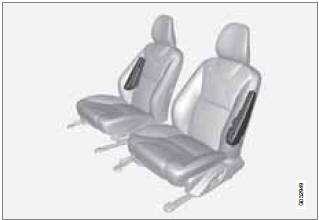
Location of the side impact (SIPS) airbags (front
seats only)
As an enhancement to the structural side impact protection built into your vehicle, it is also equipped with Side Impact Protection System (SIPS) airbags.
The SIPS airbag system is designed to help increase occupant protection in the event of certain side impact collisions. The SIPS airbags are designed to deploy only during certain side-impact collisions, depending on the crash severity, angle, speed and point of impact.
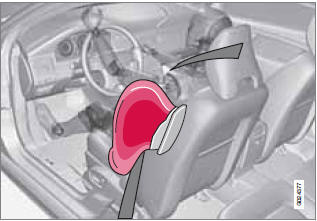
Driver's side SIPS airbag
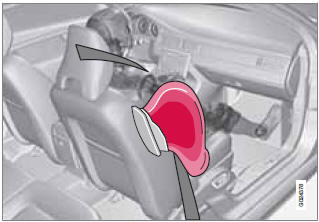
Passenger's side SIPS airbag
SIPS airbag deployment (one airbag) occurs only on the side of the vehicle affected by the impact. The airbags are not designed to deploy in all side impact situations.
NOTE
SIPS airbag deployment (one airbag) occurs
only on the side of the vehicle affected by
the impact. The airbags are not designed to
deploy in all side impact situations.
Components in the SIPS airbag system
This SIPS airbag system consists of a gas generator, the side airbag modules built into the outboard sides of both front seat backrests, and electronic sensors/wiring.
WARNING
• The SIPS airbag system is a supplement
to the structural Side Impact Protection
System and the three-point seat
belt system. It is not designed to deploy
during collisions from the front or rear of
the vehicle or in rollover situations.
• The use of seat covers on the front seats
may impede SIPS airbag deployment.
• No objects, accessory equipment or
stickers may be placed on, attached to
or installed near the SIPS airbag system
or in the area affected by SIPS airbag
deployment.
• Never try to open or repair any components
of the SIPS airbag system. This
should be done only by a trained and
qualified Volvo service technician.
• In order for the SIPS airbag to provide
its best protection, both front seat
occupants should sit in an upright position
with the seat belt properly fastened.
• Failure to follow these instructions can
result in injury to the occupants of the
vehicle in the event of an accident.
See also:
Cold weather precautions
If you wish to check your vehicle before the approach of cold weather, the following
advice is worth noting:
Make sure that the engine coolant contains 50 percent antifreeze. Any other
mixtur ...
Random
This function plays the tracks in random order
(shuffle). The random tracks/sound files can be
scrolled through in the normal way. To listen to
tracks in random order:
1. Press OK/MENU,
2. Tur ...
Replacing high/low beams/turn signal/parking light bulbs
WARNING
• The engine should not be running when
changing bulbs.
• If the engine has been running just prior
to replacing bulbs in the headlight housing,
please keep in mind that components
in th ...