
Rearview mirror with compass

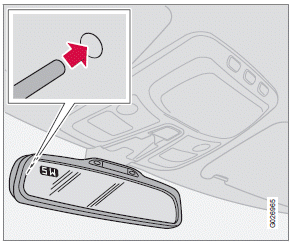
The upper left-hand corner of the rearview mirror has an integrated display that shows the compass direction toward which the car is pointing. Eight different directions can be displayed:
N, NE, E, SE, S, SW, W and NW. The display shows your car's orientation with respect to true north.
If the compass is activated, it will be displayed automatically when the ignition is in postilion II or when the engine is running. The compass can be switched off or on by pressing the inset button on the rear side of the mirror (see the inset illustration). This can be done with straightened paperclip or similar object. The button is recessed approximately 1 in. (2.5 cm) in the mirror.
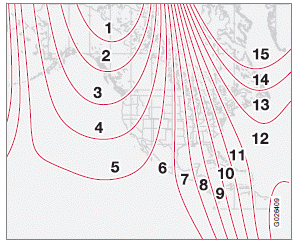
Magnetic zones
The earth is divided into 15 magnetic zones.
The compass is initially set for the zone to which the car was delivered, and should always be adjusted if the car is driven to a new magnetic zone. To do so:
1. Switch the ignition to position II.
2. Press the button on the rear side of the
mirror with straightened paperclip or similar
object for approximately 3 seconds until
ZONE is displayed. The number of the current
magnetic zone will also be displayed.
3. Press the button repeatedly until the number
for the desired zone (1 – 15) is displayed.
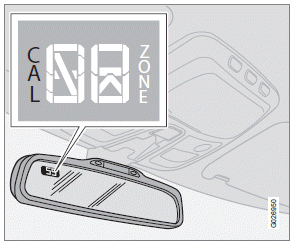
Calibrating the compass
After several seconds, the compass heading will again be displayed, and the change of magnetic zones is complete.
Calibrating the compass
1. Stop the car in a large, open area, away
from traffic.
2. Turn off as many electrical devices in the
car as possible to avoid interference with
the compass (e.g. audio system, etc).
3. Using a pen or similar object, hold the button
(on the rear side of the mirror)
depressed for at least 6 seconds.
"CAL" will be displayed.
4. Drive slowly in a circle at a maximum speed
of 5 m.p.h. (8 km/h) until CAL is no longer
displayed.
NOTE
This step can also be done by driving normally
until CAL is no longer displayed.
Calibration is complete.
See also:
Behind the wheel
The base XC60 has a 240-horsepower, 3.2-liter six-cylinder engine. I drove
the more powerful T6 version, which was a little bit of a bummer. I appreciated
the solid feel and the 325-hp, turbocharg ...
Interior
According to Volvo, the upholstery in the V50's five-passenger interior was
inspired by sportswear. The instrument panel's texture is meant to signal
technical innovation to the occupant. An Intel ...
Windows and optional moonroof
The ECC system will function best if the windows
and optional moonroof are closed. If you
drive with the moonroof open, we recommend
that you manually adjust the temperature and
blower control (th ...