
Opening/closing the hood

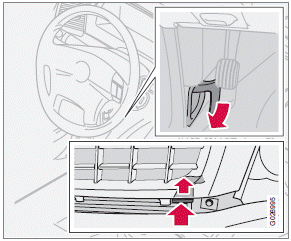
Opening the hood
1. Pull the lever located under the left side of
the dashboard to release the hood lock.
2. Lift the hood slightly.
3. Press up the release control located under
the front edge of the hood and lift.
To close the hood, place your hand on it and press down until the hood locks in the closed position.
WARNING
• Do not grasp the ribs in the grille when
closing the hood. If your fingers protrude
through the grille, they could be
injured on components in the engine
compartment as the grille closes. We
recommend pressing down on the hood
to close it.
• Check that the hood locks properly
when closed!
See also:
Premium Sound Multimedia
• 7" color TFT display
• Voice control
• Thumb wheel on the steering wheel keypad
• AM/FM/HD radio
• Sirius satellite radio
• CD/DVD (mp3 and wma file formats)
• AUX and USB sockets
• Blue ...
Gasoline containing alcohol and ethers, "Oxygenated fuels"
Some fuel suppliers sell gasoline containing "oxygenates" which are usually alcohols
or ethers. In some areas, state or local laws require that the service pump be marked
indicating use ...
Taking out the spare wheel
1. Release the bag's retaining straps.
2. Lift the bag out of the vehicle and remove the spare wheel from the bag.
3. Fold up the floor hatch in the trunk.
4. Remove the jack* and tools* from t ...