
Side impact protection airbags

Side impact airbags – front seats only
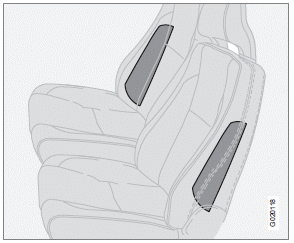
Location of the side impact ( SIPS) airbag
As an enhancement to the structural side impact protection built into your vehicle, the vehicle is also equipped with Side Impact Protection System (SIPS) airbags.
The SIPS airbag system is designed to help increase occupant protection in the event of certain side impact collisions. The SIPS airbags are designed to deploy only during certain side-impact collisions, depending on the crash severity, angle, speed and point of impact.
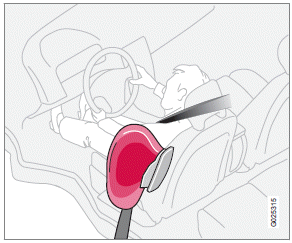
Driver's side SIPS airbag
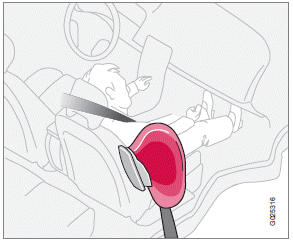
Passenger's side SIPS airbag
NOTE
SIPS airbag deployment (one airbag) occurs
only on the side of the vehicle affected by
the impact. The airbags are not designed to
deploy in all side impact situations.
Components in the SIPS airbag system
This SIPS airbag system consists of gas generators and side airbag modules built into the outboard sides of both front seat backrests.
WARNING
• The SIPS airbag system is a supplement
to the structural Side Impact Protection
System and the three-point seat
belt system. It is not designed to deploy
during collisions from the front or rear of
the vehicle or in rollover situations.
• The use of seat covers on the front seats
may impede SIPS airbag deployment.
• No objects, accessory equipment or
stickers may be placed on, attached to
or installed near the SIPS airbag system
or in the area affected by SIPS airbag
deployment.
• Never try to open or repair any components
of the SIPS airbag system. This
should be done only by a trained and
qualified Volvo service technician.
• In order for the SIPS airbag to provide
its best protection, both front seat
occupants should sit in an upright position
with the seat belt properly fastened.
• Failure to follow these instructions can
result in injury to the occupants of the
vehicle in the event of an accident.
See also:
Booster cushions
Securing a booster cushion
Position the child correctly on the booster cushion
Booster cushions are recommended for children
who have outgrown convertible seats.
1. Place the booster cushion in ...
Changing a wheel
1. Apply the parking brake and put the gear selector in P.
2. Take out the jack*, lug wrench*, the towing eyelet and the wheel cover removal
tool* stowed under the floor of the trunk.
3. Remove th ...
Introduction
Volvo advises you to follow the maintenance
program outlined in the Warranty and Service
Records Information booklet. This maintenance
program contains inspections and services
necessary for t ...