
Trunk lighting

 NOTE
NOTE
Before starting to replace a bulb, see page 306.
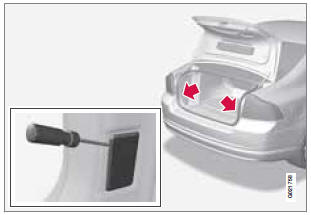
The trunk lighting is located on opposite sides of the trunk.
1. Insert a screwdriver and gently turn so that the bulb housing comes loose.
2. Replace the bulb.
3. Check that the bulb illuminates and press it back into the bulb housing.
See also:
Wiper blades
The windshield wiper blades are different
lengths. The blade on the driver’s side is longer
than the one on the passenger side.
Service position
Wiper blades in service position
The wiper bla ...
Using HDC
HDC allows the car to roll forward at a maximum
speed of 6 mph (10 km/h), and 4 mph
(7 km/h) in reverse. However, the accelerator
pedal can be used to select any speed that is
possible in firs ...
Driving Impressions
Volvo's smallest wagon is just as refined and tightly built as the bigger
V70, if a bit snug inside. Performance is a strong point with the turbocharged
model, but the T5's ride can get rough on h ...