
Exterior
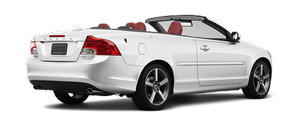
The C70 looks good when the top is up and even better when the top is down. This car doesn't attempt to justify a weak design due to the fun factor. As much thought went into the good looks of the C70 as the thrilling convertible nature of it.
With the top up, the untrained eye has no clue it's a convertible. All of my neighbors were wowed when the top went down. In parking lots, people would watch as the top went up or down. While it garnered lots of attention, what I liked best about the hardtop is it feels secure, with no rattles or creaks when driving with it up.
Getting in and out of the two-door C70 was a struggle for my kids. They're 6 and 8, so mostly this had to do with patience, which they have very little of most of the time. Remembering to move the seat belt out of the way when getting in and out was the biggest problem. They also had difficulty figuring out how to close the door once they were in the backseat. Eventually, we just decided to all get in and out on the driver's side all the time. Younger kids might not like this all that much and get tired of the effort every time.
With its 227-horsepower, turbocharged 2.5-liter inline-five-cylinder engine, the C70 is fun to drive with the top up or down. The C70 gets an EPA-estimated 19/28 mpg city/highway and uses premium gas.
SENSE AND STYLE
Family Friendly (Not Really, Fair, Great, Excellent): Excellent
Fun-Factor (None, Some, Good Times, Groove On): Groove On
See also:
Locks
The alarm indicator light on the dashboard will stop flashing to indicate that
the alarm is not monitoring the entire vehicle. The accessory movement and inclination
sensors will be automatically ...
Signals from the park assist system
View in the display (warning for objects front left/right rear) ...
Main instrument panel
Information display and menu controls
1 READ – access to the list of messages and
message confirmation.
2 Thumbwheel – browse among menus and
options in the list of functions.
3 RESET – reset ...