
Top tether anchors

Child restraint anchorages
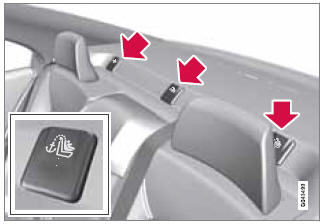
Your Volvo is equipped with child restraint top tether anchorages in the rear seat. They are located on the rear parcel shelf.
Securing a child seat
1. Place the child restraint on the rear seat.
2. Fold up the plastic cover
over the anchorage to be used.
3. Route the top tether strap under the head restraint
and attach it to the anchor.
4. Fold down the outboard head restraints or lower
the center head restraint for easier access to the ISOFIX/LATCH anchor.
5. Attach
lower tether straps to the lower ISOFIX/ LATCH anchors. If the child restraint is
not equipped with lower tether straps, or the restraint is used in the center seating
position, follow instructions for securing a child restraint using the Automatic
Locking Retractor seat belt (see page 40).
6. Firmly tension all straps.
Refer also to the child seat manufacturer's instructions for information on securing the child seat.
 WARNING
- Never route a top tether strap over the top of the head restraint. The strap should be routed beneath the head restraint.
- Child restraint anchorages are designed to withstand only those loads imposed by correctly fitted child restraints. Under no circumstances are they to be used for adult seat belts or harnesses. The anchorages are not able to withstand excessive forces on them in the event of collision if full harness seat belts or adult seat belts are installed to them. An adult who uses a belt anchored in a child restraint anchorage runs a great risk of suffering severe injuries should a collision occur.
- Do not install rear speakers that require the removal of the top tether anchors or interfere with the proper use of the top tether strap.
See also:
Automatic connection
When the Bluetooth® function is active and the
most recently paired device is within range, it
is automatically connected. When the infotainment
system searches for the most recently
paired de ...
Airbag decals
Airbag decal on the outside of both sun visors
Passenger's side airbag decal
WARNING
• Children must never be allowed in the
front passenger's seat.
• Occupants in the front passenger's seat ...
Selecting a sound source
• Press AM/FM (4) repeatedly to toggle
between FM1, FM2, and AM
• Press the CD button (1) to change to the
CD player or optional CD changer
• Turn the SELECTOR control (5) to choose
FM1, FM2, AM, ...