
Side marker lights

NOTE
Before starting to replace a bulb, see
page 322.
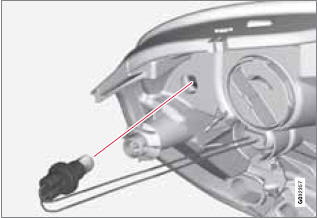
1. Remove the headlight housing from the vehicle (see page 322).
2. Remove the bulb holder by turning it counterclockwise and pulling it out of the headlight housing.
3. Pull out the burned out bulb and install a new one. It can only be inserted in one position.
4. Reinsert the bulb holder into the headlight housing and turn it clockwise.
5. Reinstall the headlight housing.
See also:
Summary
• The camera is activated when the gear
selector is moved to R (this can be
changed in the MY CAR menu) and the image is shown on the center console
display.
• When backing up, two solid lines ...
HD Radioreception (U.S. models only)
Introduction
Display when the radio is receiving an HD Radio
broadcast
HD radio is a brand name registered by the
Ibiquity digital corporation2. They are the
developer of a broadcasting technol ...