
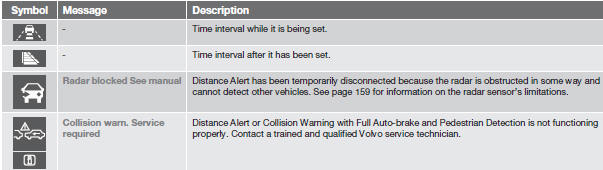
Symbols and messages in the display

See also:
Spots on interior plastic, metal, or wood surfaces
Cleaning interior plastic components should
be done with a cleaning agent specially
designed for this purpose. Consult your Volvo
retailer. ...
Brake pad inspection
On vehicles equipped with a jack, the condition
of the brake pads can be checked by raising
the vehicle (see page 190 for information
about using the jack and removing a wheel)
and performing a vi ...
Passenger compartment filter
Replace the cabin air filter with a new one at
the recommended intervals. Please refer to
your Warranty and Service Records Information
booklet, or consult a trained and qualified
Volvo servic ...