
Integrated two-stage booster cushion

Volvo's optional integrated booster cushions are located in the outboard seating positions.
These booster cushions have been specially designed to help safeguard children in the rear seat. They should be stowed (folded down into the seat cushion) when not in use. When using an integrated booster cushion, the child must be secured with the vehicle's three-point seat belt.
Use these booster cushions only with children whose
weight is between:
• Stage 1: 48 – 80 lbs (22 – 36 kg)
• Stage 2: 33 – 55 lbs (15 – 25 kg)
and whose height is between:
• Stage 1: 45 – 55 in. (115 – 140 cm)
• Stage 2: 37 – 47 in. (95 – 120 cm)
In Canada, Transport Canada's weight recommendation is
40 – 80 lbs (18 – 36 kg).
The booster cushions are designed to raise the child higher, so that the shoulder strap crosses over the child's collarbone, not over the child's neck. If using a booster cushion does not result in proper positioning of the shoulder strap, then the child should be placed in a properly secured child restraint (see page 40). The shoulder belt must never be placed behind the child's back or under the arm.
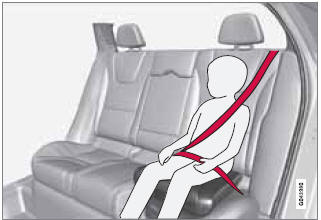
Correct seating position: child's head is below the
head restraint and the shoulder belt is across the
collarbone
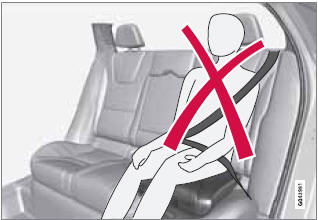
Incorrect seating position: the child's head is
above the head restraint and the shoulder belt is not
across the collarbone
Before driving, check that:
• The integrated two-stage booster cushion is set in the correct position for according to the child's height and weight (see the table below) and is locked in position.
| Stage 1 | Stage 2 | |
| Weight | 48 – 80 lbs 22 – 36 kg |
33 – 55 lbs 15 – 25 kg |
| Height | 45 – 55 in. 115 – 140 cm |
37 – 47 in. 95 – 120 cm |
• That the seat belt is properly positioned and is taut.
• The shoulder section of the seat belt is across the child's collarbone, not over the neck.
• The lap section of the seat belt is across the child's hips and not the abdomen.
See also:
Deposit control gasoline (detergent additives)
Volvo recommends the use of detergent gasoline to control engine deposits. Detergent
gasoline is effective in keeping injectors and intake valves clean. Consistent use
of deposit control gasolines ...
Indicator and information symbols
Fault in
the Active Bending Light
(ABL) system
This symbol will illuminate if the there is a fault
in the ABL system. See page 93 for more
information about this system.
Malfunction ...
Repairing stone chips
1. Place a strip of masking tape over the damaged
surface. Pull the tape off so that any
loose flakes of paint adhere to it.
2. Thoroughly mix the primer and apply it with
a small brush.
3. ...