
ISOFIX/LATCH lower anchors

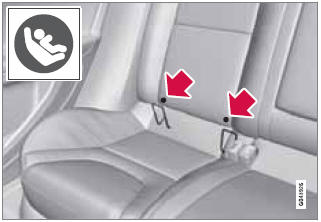
Using the ISOFIX/LATCH lower child seat anchors
Lower anchors for ISOFIX/LATCH-equipped child seats are located in the rear, outboard seats, hidden below the backrest cushions.
Symbols on the seat back upholstery mark the anchor positions as shown. To access the anchors, kneel on the seat cushion and locate the anchors by feel. Always follow your child seat manufacturer's installation instructions, and use both ISOFIX/LATCH lower anchors and top tethers whenever possible.
To access the anchors
1. Put the child restraint in position.
2. Kneel on the child restraint to press down the seat cushion and locate the anchors by feel.
3. Fasten the attachment on the child restraint's lower straps to the ISOFIX/ LATCH/LATCH lower anchors.
4. Firmly tension the lower child seat straps according to the manufacturer's instructions.
WARNING
Volvo's ISOFIX/LATCH anchors conform to
FMVSS/CMVSS standards. Always refer to
the child restraint system's manual for
weight and size ratings.
NOTE
• The rear seat's center position is not
equipped with ISOFIX/LATCH lower
anchors. When installing a child
restraint in this position, attach the
restraint's top tether strap (if it is so
equipped) to the top tether anchorage
point and secure the restraint with the
vehicle's center seat belt.
• Always follow your child seat manufacturer's
installation instructions, and use
both ISOFIX/LATCH lower anchors and
top tethers whenever possible.
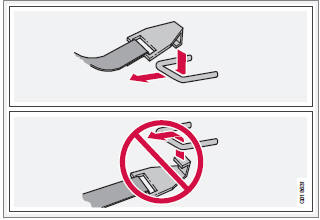
Fasten the attachment correctly to the ISOFIX/LATCH lower anchors
WARNING
• Be sure to fasten the attachment correctly
to the anchor (see the illustration).
If the attachment is not correctly fastened,
the child restraint may not be
properly secured in the event of a collision.
• The ISOFIX/LATCH lower child restraint
anchors are only intended for use with
child seats positioned in the outboard
seating positions. These anchors are
not certified for use with any child
restraint that is positioned in the center
seating position. When securing a child
restraint in the center seating position,
use only the vehicle's center seat belt.
See also:
Tire age
Tires degrade over time, even when they are not being used. It is recommended
that tires generally be replaced after 6 years of normal service. Heat caused by
hot climates, frequent high loading c ...
Steering wheel keypad
The keypad varies according to the vehicle's equipment
1 Turn the thumb wheel to go up/down
among menu selections. Press the thumb
wheel to make a selection or store a function
in the system' ...
Driver Alert Control (DAC)– introduction
This function is intended to alert the driver if
his/her driving becomes erratic, such as if the
driver is distracted or fatigued.
NOTE
The camera has certain limitations, see
page 159.
A c ...