
Driver Alert Control (DAC)– introduction

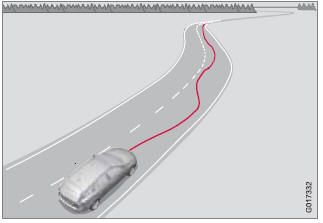
This function is intended to alert the driver if his/her driving becomes erratic, such as if the driver is distracted or fatigued.
NOTE
The camera has certain limitations, see
page 159.
A camera monitors the painted lines marking the lane in which the vehicle is traveling and compares the direction of the road with the driver’s movements of the steering wheel. The driver is alerted if the vehicle does not follow the lane smoothly.
DAC is designed to help detect a slowly changing driving pattern. It is primarily intended to be used on main roads and is not meant for use in city traffic.
WARNING
• DAC is not intended to extend the duration
of driving. Always plan breaks at
regular intervals to help remain alert.
• In certain cases, fatigue may not affect
the driver’s behavior. In situations of
this type, no warning will be provided.
Therefore, it is important to take breaks
at regular intervals, regardless of
whether or not DAC has given a warning.
See also:
Interior lighting, front
Light switches, front roof lighting
1 Drivers side front reading light, on/off.
2 Passenger's side front reading light, on/off.
3 Overhead courtesy lighting.
The lighting in the front part of th ...
Custom Build Program
In addition to traditional optional features like a navigation system, power
moonroof and Sirius Satellite Radio, buyers who want to customize the C30 can do
so through Volvo's Custom Build progra ...
Cold weather precautions
If you wish to check your vehicle before the
approach of cold weather, the following advice
is worth noting:
• Make sure that the engine coolant contains
50 percent antifreeze. Any other mixtur ...