
Replacing the daytime running lightbulb (models with Active BendingLights only)
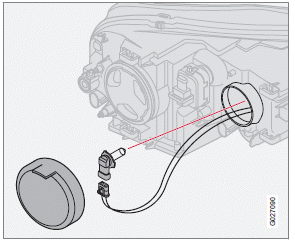
1. Remove the rubber cover over the bulb by
pulling it off.
2. Turn the bulb holder counterclockwise and
pull it out of the headlight housing.
3. Remove the connector from the bulb unit
by pressing the lock tab out and pulling.
4. Connect the connector to the new bulb unit
until it clicks into place.
5. Press a new bulb unit into the headlight
housing and turn it clockwise into place.
6. Reinstall the plastic cover.
See also:
Auto
The function automatically
regulates cooling, heating, blower speed, recirculation, and air distribution to
maintain the chosen temperature. If you select one or more manual functions, the
other ...
Rollover Protection System (ROPS)
Volvo’s Rollover Protection System utilizes the
Roll Stability Control (RSC) function, which is
designed to help minimize the risk of a rollover
in emergency maneuvers or if a skid should
occu ...
Signals from the park assist system
View in the display (warning for objects front left/right rear) ...