
Engaging the cruise control function

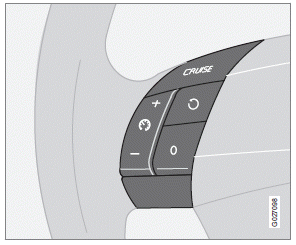
The cruise control panel is located on the left side of the steering wheel hub.
NOTE
This does not set the vehicle's speed.
1. Press the CRUISE button.
> CRUISE will be displayed in the information
window in the instrument panel.
2. Press + or – to set the current speed.
> CRUISE-ON will be displayed in the
information window in the instrument
panel.
See also:
Reinserting the key blade in the remote key
1. Hold the remote key with the slot for the
key blade up.
2. Carefully slide the key blade into its groove.
3. Gently press the key blade in the groove
until it clicks into place. ...
Electrical system
General information
12-volt system with voltage controlled generator.
Single wire system in which the chassis
and engine block are used as conductors,
grounded on the chassis.
Battery
If you ...
Audible signal
The Park Assist system uses an intermittent tone that pulses faster as you come
close to an object, and becomes constant when you are within approximately 1 ft
(30 cm) of an object in front of or ...