
Location

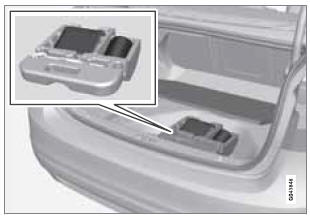
The vehicle is equipped with a tire sealing system that enables you to temporarily seal a hole in the tread surface and re-inflate a flat tire, or to adjust a tire’s inflation pressure.
The system consists of an air compressor, a container for the sealing compound, wiring to connect the system to the vehicle’s electrical system via one of the 12-volt sockets, and a hose used to connect the system to the tire’s inflation valve.
The 12-volt sockets are located in the front tunnel console and on the rear side of the center console in the rear seat, see page 201.
Accessing the tire sealing system
The tire sealing system is stowed under the floor of the trunk. To access it:
1. Lift the floor hatch in the cargo area.
2. Lift out the tire sealing system.
 NOTE
NOTE
- The tire sealing system is only intended to seal holes on the tire’s tread area, not the sidewall.
- Tires with large holes or tears cannot be repaired with the tire sealing system.
- After use, stow the tire sealing system properly to help prevent rattling.
 WARNING
- After using the tire sealing system, the vehicle should not be driven farther than approximately 120 miles (200 km).
- Have the tire inspected by a trained and qualified Volvo service technician as soon as possible to determine if it can be permanently repaired or must be replaced.
- The vehicle should not be driven faster than 50 mph (80 km/h) while using a tire that has been temporarily repaired with the tire sealing system.
- After using the tire sealing system, drive carefully and avoid abrupt steering maneuvers and sudden stops.
See also:
Maintenance service
Periodic maintenance will help keep your vehicle
running well. Your Warranty and Service
Records Information booklet provides a comprehensive
maintenance schedule up to
150,000 miles (240,000 km) ...
Sense and style
Family Friendly (Not Really, Fair, Great, Excellent): Great
Fun-Factor (None, Some, Good Times, Groove-On): Some ...
Reinserting the key blade in the remote key
1. Hold the remote key with the slot for the key blade up.
2. Carefully slide the key blade into its groove.
3. Gently press the key blade in the groove until it clicks into place. ...