
Blind Spot Information System*

Introduction
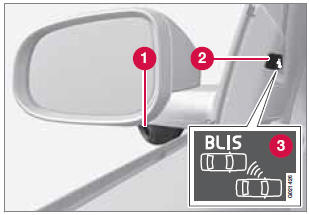
1 - BLIS camera
2 - Indicator light
3 - BLIS symbol
The Blind Spot Information System (BLIS) is an information system that indicates the presence of another vehicle moving in the same direction as your vehicle in the side-view mirror's "blind area."
CAUTION
The BLIS system should only be repaired by a trained and qualified Volvo service technician.
 WARNING
- BLIS is an information system, NOT a warning or safety system.
- BLIS does not eliminate the need for you to visually confirm the conditions around you, and the need for you to turn your head and shoulders to make sure that you can safely change lanes.
- As the driver, you have full responsibility for changing lanes in a safe manner.
The system is based on digital camera technology. The cameras are located beneath the side-view mirrors.
When one (or both) of the cameras have detected a vehicle in the blind area (up to approximately 10 ft. (3 meters) from the side of your vehicle, and up to approximately 31 ft. (9.5 meters) behind the side-view mirror), see the illustration, the indicator light in the door panel illuminates. The light will glow continuously to alert the driver of the vehicle in the blind area.
 NOTE
NOTE
The door panel indicator light illuminates on the side of the vehicle where the system has detected another vehicle. If your vehicle is passed on both sides at the same time, both lights will illuminate.
BLIS has an integrated function that alerts the driver if a fault should occur with the system. For example, if one or both of the system's cameras are obscured, a message (see the table on page 197) will appear in the information display in the instrument panel. If this occurs, clean the camera lenses. If necessary, the system can be temporarily switched off (for instructions, see page 197).
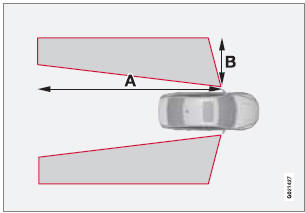
Areas monitored by BLIS Distance A = approx. 31 ft. (9.5 meters), Distance B = approx. 10 ft. (3 meters)
See also:
The laser sensor
The upper decal describes the laser beam's classification and contains the following
text:
Invisible Laser radiation – Do not view directly with optical instruments (magnifiers)
– Class 1M ...
Types of lists used in the manual
Procedures
Procedures (step-by-step instructions), or
actions that must be carried out in a certain
order, are arranged in numbered lists in this
manual.
1 If there is a series of illustration ...
Cleaning the brake discs
Coatings of dirt and water on the brake discs
may result in delayed brake function. This delay
is minimized by cleaning the brake linings.
Cleaning the brake pads is advisable in wet
weather, p ...