
Driver Alert Control (DAC)– introduction

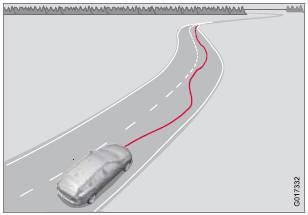
This function is intended to alert the driver if his/her driving becomes erratic, such as if the driver is distracted or fatigued.
 NOTE
NOTE
The camera has certain limitations, see page 160.
A camera monitors the painted lines marking the lane in which the vehicle is traveling and compares the direction of the road with the driver’s movements of the steering wheel. The driver is alerted if the vehicle does not follow the lane smoothly.
DAC is designed to help detect a slowly changing driving pattern. It is primarily intended to be used on main roads and is not meant for use in city traffic.
 WARNING
- DAC is not intended to extend the duration of driving. Always plan breaks at regular intervals to help remain alert.
- In certain cases, fatigue may not affect the driver’s behavior. In situations of this type, no warning will be provided. Therefore, it is important to take breaks at regular intervals, regardless of whether or not DAC has given a warning.
Limitations
In certain situations, DAC may provide warnings even if the driver’s driving pattern has not become erratic.
- if the driver is testing the LDW function
- in strong crosswinds
- on grooved road surfaces.
See also:
Safety
Though its sister model, the S40 sedan, earned good crash-test scores from
the Insurance Institute for Highway Safety, the wagon hasn't been crash tested.
Unfortunately, differences in weight and ...
On and off
To switch Collision Warning on or off, press MY CAR on the center console control
panel and go to Settings Car settings Driver support systems Collision Warning.
If Collision Warning is on, the sy ...
Rear seats
The seat belt reminder in the rear seat has two additional functions:
It provides information about which seat belts are fastened in the rear
seat. A message will appear in the information disp ...