
Troubleshooting

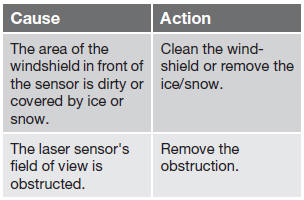
If Windscreen Sensors blocked appears in the information display, this indicates that the City Safety™ laser sensor is obstructed in some way and cannot detect vehicles ahead of you, which means that the system is not functioning.
However, this message will not be displayed in all situations in which the sensor is obstructed. For this reason, the driver must ensure that the area of the windshield in front of the sensor is always kept clean.
The following table shows some of the situations that can cause the message to be displayed and suggested actions.
CAUTION
If a crack, scratch or stone chip should occur in the section of the windshield in front the laser sensor and covers an area of approximately 1/50 x 1/10 in. (0.5 x 3 mm) or larger, contact a trained and qualified Volvo service technician to repair or replace the windshield (see the illustration showing the location of the sensor on page 169). Failing to do so may result in reduced City Safety™ functionality.
To help prevent reduced functionality, please also observe the following:
- If the windshield is replaced, use the same type or a windshield approved by Volvo.
- When replacing windshield wipers, use the same type or ones approved by Volvo.
See also:
Disposing of old batteries
Worn out batteries should be disposed of in an
environmentally responsible manner. ...
Disconnecting an external device
The external device is automatically disconnected
from the audio system if it is moved out
of range. ...
Random
This function plays the audio files on the external
device in random order (shuffle). This function
can be activated/deactivated under:
Bluetooth menu
Random
Press the buttons on the cente ...