
Operating

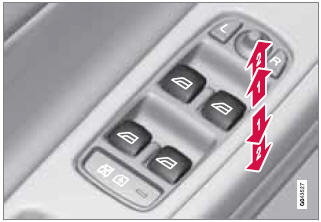
Operating the power windows
1 - Manual up/down
2 - Auto up/down.
All power windows can be operated using the control panel in the driver's door. The control panels in the other doors only operate the window in the respective doors.
For the power windows to function, the ignition must be in at least mode I. When the vehicle has been running, the power windows can be operated for several minutes after the remote key has been removed from the ignition slot, or until a door has been opened.
 NOTE
NOTE
- Movement of the windows will stop if they are obstructed in any way.
- To reduce buffeting wind noise if the rear windows are opened, also open the front windows slightly.
Manual up/down
Move one of the controls up/down slightly.
> The power windows move up/down as long as the control is held in position.
Auto up/down
Move one of the controls up/down as far as possible and release it.
> The window will open or close completely.
See also:
Function
Location of the laser sensor in the windshield
City Safety™ monitors traffic ahead of you
using a laser sensor mounted in the upper section
of the windshield. If a collision is imminent,
City ...
Removing the key blade
Slide the spring loaded
catch to the side.
Pull the key blade straight
out of the remote key. ...
Marker lines
The PAC system's lines
1 Marker line for a 1-foot (30-centimeter)
zone behind the vehicle
2 Marker line for the clear back-up zone
3 "Wheel tracks"
The solid line (1) indicates a zon ...