
Folding down the rear seat backrests

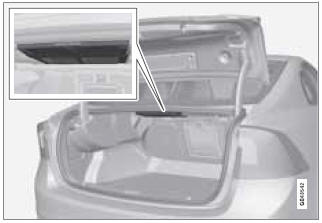
The rear seat backrests are split and can be folded down together or separately
1. Pull the release control handle(s).
2. Fold the backrest forward. Adjust the center seat head restraint if necessary.
 NOTE
NOTE
When the backrests are folded down, move the outboard head restraints forward slightly so that they do not catch on the seat cushion.
CAUTION
To help avoid damage to the upholstery, there should be no objects on the rear seat and the seat belt should not be buckled when the backrest is folded down.
 WARNING
- Keep vehicle doors and trunk locked and keep keys out of a child’s reach. Unsupervised children could lock themselves in an open trunk and risk injury. Children should be taught not to play in vehicles.
- On hot days, the temperature in the trunk or vehicle interior can rise very quickly. Exposure of people to these high temperatures for even a short period of time can cause heat-related injury or death. Small children are particularly at risk.
WARNING
- When one or more sections of the backrest is returned to the upright position, check that it is properly locked in place by pushing and pulling it. The red indicators should also not be visible.
- Return the outboard head restraints to the upright position.
- Long loads should always be securely anchored to help avoid injury in the event of a sudden stop.
- Always turn the engine off and apply the parking brake when loading/unloading the vehicle.
- Place the transmission in the Park (P) position to help prevent inadvertent movement of the gear selector.
- On hot days, the temperature in the vehicle interior can rise very quickly. Exposure of people to these high temperatures for even a short period of time can cause heat-related injury or death. Small children are particularly at risk.
See also:
My XC60
MY CAR
My XC60
The display shows all of the vehicle's driver
support systems, which can be activated/
deactivated here. ...
SCAN
This function automatically searches the currently
selected waveband (AM, FM1, or FM2)
for strong stations. When the radio finds a station,
it will pause for approximately 8 seconds,
after which i ...
Main AM menu
AM menu
Show presets
Scan
Audio settings
Sound stage
Equalizer
Volume compensation
Reset all audio settings ...