
Opening the trunk manually

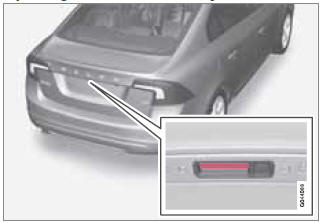
The trunk is held closed by an electronic locking mechanism. To open:
1. Press lightly on the rubberized plate under the handle to release the lock.
2. Lift the handle to open the trunk lid.
CAUTION
- When pressing the rubberized plate, only light pressure is necessary to release the trunk's electronic locking mechanism.
- When opening the trunk lid, pull it up using the handle. Too much pressure on the rubberized plate can damage its electrical connections.
See also:
Cargo area cover
...
Remote control
A remote control is included with the RSE system,
which can be used to control both screens
in the rear seat as well as other infotainment
system functions.
See page 254 for more detailed infor ...
News - City Safety
City Safety is a new function, sensing if vehicles ahead are moving slower or
standing still. By measuring the car's speed and distance to the vehicle ahead,
City Safety is able to calculate the b ...