
Cargo area

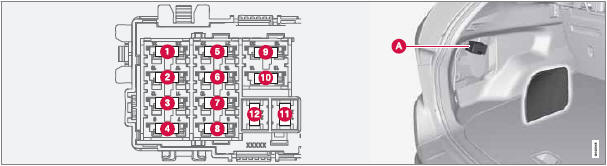
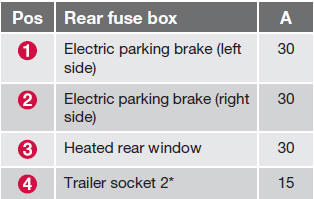
Located behind the upholstery on the left side of the cargo area
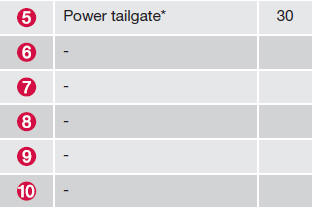
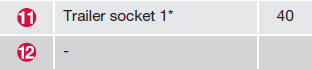
Positions
NOTE
Please consult a Volvo retailer’s Parts
department for the most up-to-date specifications.
See also:
Storing the position
The mirror positions are stored in the key memory
when the vehicle has been locked with the
remote key. When the vehicle is unlocked with
the same remote control the mirrors and the
driver's s ...
Water on brake discs and brake padsaffects braking
Driving in rain and slush or passing through an
automatic car wash can cause water to collect
on the brake discs and pads. This will cause a
delay in braking effect when the pedal is
depressed. To ...
Activating/deactivating TPMS (Canadian models only)
1. Switch off the engine.
2. Put the ignition in mode I or II (see page
82 for additional information).
3. Press the MY CAR key in the center console
control panel and select Settings
Car se ...