
Rear control panel with headphone sockets

Headphones with an impedance of 16 – 32 ohm and sensitivity of 102 dB or higher are recommended for best sound reproduction.
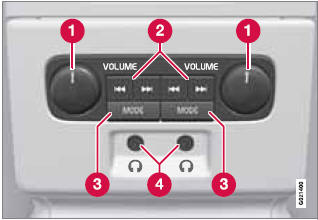
1 Volume control (right/left sides).
2 Scroll/search forward and back.
3 MODE – select: AM, FM1, FM2,HD Radio3, Sirius1*, Sirius2*, Disc, USB, iPod, Bluetooth, AUX and ON/OFF.
4 Headphones sockets (3.5 mm)
See also:
Introduction
The HomeLink1 Wireless Control System provides a convenient way to replace up
to three hand-held radio-frequency (RF) transmitters used to activate devices such
as gate operators, garage door op ...
Watching a video
Video tracks/files can be viewed via the vehicle's
media player or the USB socket.
For more information about the media player,
see page 225 or page 227 for information about
the USB socket.
1 ...
Introduction
Collision Warning with Full Auto-brake and
Pedestrian Detection is designed to assist the
driver if there is a risk of a collision with a
pedestrian, a vehicle ahead that is at a standstill
or ...