
Troubleshooting

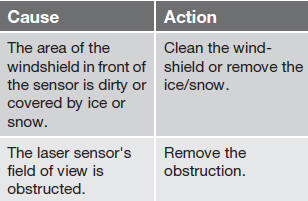
If Windscreen Sensors blocked appears in the information display, this indicates that the City Safety™ laser sensor is obstructed in some way and cannot detect vehicles ahead of you, which means that the system is not functioning.
However, this message will not be displayed in all situations in which the sensor is obstructed.
For this reason, the driver must ensure that the area of the windshield in front of the sensor is always kept clean.
The following table shows some of the situations that can cause the message to be displayed and suggested actions.
CAUTION
If a crack, scratch or stone chip should
occur in the section of the windshield in
front the laser sensor and covers an area of
approximately 1/50 x 1/10 in. (0.5 x 3 mm)
or larger, contact a trained and qualified
Volvo service technician to repair or replace
the windshield (see the illustration showing
the location of the sensor on page 168).
Failing to do so may result in reduced City
Safety™ functionality.
To help prevent reduced functionality,
please also observe the following:
• If the windshield is replaced, use the
same type or a windshield approved by
Volvo.
• When replacing windshield wipers, use
the same type or ones approved by
Volvo.
See also:
Driving Dynamics: Engines
The new Volvo V50 Sportswagon is available with a range of eight modern
engines, including three diesels, that reflect its role as a premium
alternative. Two engines joined the range for 2007: a 1 ...
Hood and engine compartment
Turn the handle located under the left side of the dash approximately 20-25
degrees clockwise to release the hood lock.
Lift the hood slightly. Press the release control (located under the r ...
Driving Impressions
Understated and elegant, the S80 is spacious throughout and delivers a
smooth, easy ride. Automatic-transmission shifts are smooth yet noticeable. The
easy-to-drive S80 promises excellent control ...