
Situations where ACC may not function optimally

WARNING
• The radar sensor has a limited field of
vision. In some situations it may detect
a vehicle later than expected or not
detect other vehicles at all.
• If ACC is not functioning properly,
cruise control will also be disabled.
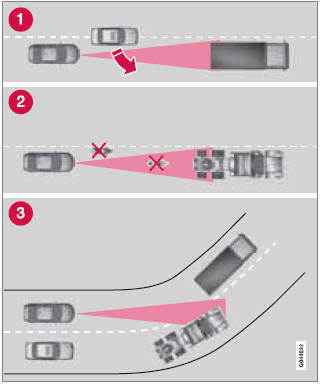
Radar sensor's field of vision (shown in pink)
1 In certain situations, the radar sensor cannot detect vehicles at close quarters, for example a vehicle that suddenly enters the lane between your vehicle and the target vehicle.
2 Small vehicles, such as motorcycles, or vehicles not driving in the center of the lane may remain undetected.
3 In curves, the radar sensor may detect the wrong vehicle or lose sight of the target vehicle.
WARNING
• Adaptive Cruise Control cannot cover
all driving situations and traffic, weather
and road conditions. The "Function"
section provides information about limitations
that the driver must be aware of
before using this feature.
• This system is designed to be a supplementary
driving aid. It is not, however,
intended to replace the driver's attention
and judgement. The driver is
responsible for maintaining a safe distance
and speed and must intervene if
Adaptive Cruise Control does not maintain
a suitable speed or suitable distance
to the vehicle ahead.
• Maintenance of ACC components may
only be performed by a trained and
qualified Volvo technician.
WARNING
• Adaptive Cruise Control is not a collision
avoidance system. The driver is
always responsible for applying the
brakes if the system does not detect
another vehicle.
• Adaptive Cruise Control does not react
to people or animals, or small vehicles
such as bicycles and motorcycles. It
also does not react to slow moving,
parked or approaching vehicles, or stationary
objects.
• Do not use Adaptive Cruise Control in
demanding driving conditions such as
city driving or other heavy traffic situations,
in slippery conditions, when there
is a great deal of water or slush on the
road, during heavy rain or snow, in poor
visibility, on winding roads or on highway
on- or off-ramps.
See also:
Towing a trailer
The maximum weights recommended by Volvo
for trailers with brakes are shown in the table
below.
Recommended hitch tongue load: not more
than 10% of the trailer's weight. The trailer
load should ...
Front/rear park assist
Front/rear park assist
The park assist system is designed to assist
you when driving into parking spaces, garages,
etc. It utilizes four ultrasound sensors located
in one or both bumpers to ...
Engine compartment, overview
The appearance of the engine compartment
may vary depending on engine model.
1 Coolant expansion tank
2 Power steering fluid reservoir
3 Engine oil dipstick
4 Radiator
5 Filler cap for engine ...