
Bulb specifications

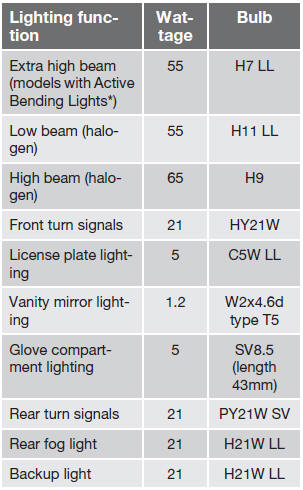
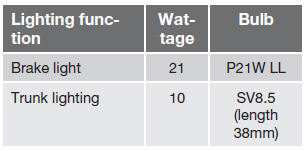
 NOTE
NOTE
Please consult a Volvo retailer’s Parts department for the most up-to-date specifications.
See also:
Vehicle event data (Black box)
Your vehicle's driving and safety systems
employ computers that monitor, and share
with each other, information about your vehicle's
operation. One or more of these computers
may store what they m ...
Function
Location of the laser sensor in the windshield2
City Safety™ monitors traffic ahead of you using a laser sensor mounted in the
upper section of the windshield. If a collision is imminent, City Sa ...
From inside the vehicle (central locking button)
Central locking button
The lock buttons on the door panel can be used
to lock or unlock all doors and the tailgate at
the same time. Press to lock and
to
unlock.
Unlocking
The vehicle ca ...