
Hazard warning flashers

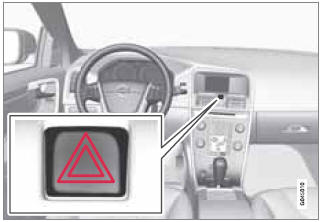
Location of the hazard warning flasher button
The hazard warning flasher should be used to indicate that the vehicle has become a traffic hazard.
To activate the flashers, press the button in the center dash. Press the button again to turn off the flashers.
NOTE
• Regulations regarding the use of the
hazard warning flasher may vary,
depending on where you live.
• The hazard warning flashers will be activated
automatically if an airbag
deploys.
See also:
Adjusting
Adjusting the steering wheel
1 Lever for releasing/locking the steering
wheel
2 Possible positions
The steering wheel can be adjusted for both
height and reach:
1. Pull the lever toward you ...
Windshield wipers
1 Thumb wheel
2 Rain sensor on/off
Windshield wipers off
If the lever is in the 0 position
and
you move it upwards, the wipers
will sweep one stroke at a time for
as long as you hold the lev ...
Engine oil
Engine oil must meet the minimum ILSAC
specification GF-4, API SL, or ACEA A1/B1.
Lower quality oils may not offer the same fuel
economy, engine performance, or engine protection.
Volvo recommen ...