
Tire sealing system–overview

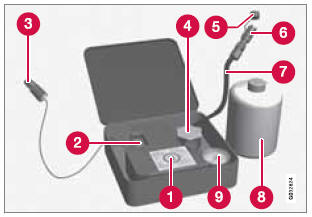
- Speed limit sticker
- On/Off switch
- Electrical wire
- Bottle holder (orange cover)
- Protective hose cover
- Air release knob
- Hose
- Bottle with sealing compound
- Air pressure gauge
 WARNING
Please keep the following points in mind when using the tire sealing system:
- The sealing compound bottle (no. 8 in the illustration) contains 1.2-Ethanol and natural rubber-latex. These substances are harmful if swallowed.
- The contents of this bottle may cause allergic skin reactions or otherwise be potentially harmful to the skin, the central nervous system, and the eyes.
Precautions:
- Keep out of reach of children.
- Do not ingest the contents.
- Avoid prolonged or repeated contact with the skin.
- Hands should be washed thoroughly after handling.
First aid:
- Skin: Wash affected areas of skin with soap and water. Get medical attention if symptoms occur.
- Eyes: Flush with plenty of water for least 15 minutes, occasionally lifting the upper and lower eyelids. Get medical attention if symptoms occur.
- Inhalation: Move the person to fresh air. If irritation persists, get medical attention.
 NOTE
NOTE
Do not break the seal on the bottle. This occurs automatically when the bottle is screwed into the holder.
See also:
Keypads
Keypads in the steering wheel
1 - Cruise control, see page 153. Adaptive cruise control*, see page 155.
2 - Infotainment controls, see page 207. ...
Safety Features
The S80 excels at safety. Before the little bubble above your head fills with
the word "Duh," let me add that this Volvo has some breakthrough safety gizmos
we hadn't seen until very rec ...
Random
This function plays the tracks in random order (shuffle). The random tracks/sound
files can be scrolled through in the normal way. To listen to tracks in random order:
1. Press OK/MENU,
2. Turn TU ...