
Introduction

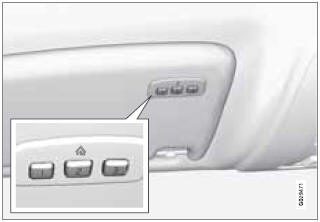
The HomeLink1 Wireless Control System provides a convenient way to replace up to three hand-held radio-frequency (RF) transmitters used to activate devices such as gate operators, garage door openers, entry door locks, security systems, even home lighting. Additional HomeLink information can be found on the Internet at www.homelink.com.
 WARNING
- If you use HomeLink to open a garage door or gate, be sure no one is near the gate or door while it is in motion.
- When programming a garage door opener, it is advised to park outside of the garage.
- Do not use HomeLink with any garage door opener that lacks safety stop and reverse features as required by U.S. federal safety standards (this includes any garage door opener model manufactured before April 1, 1982). A garage door that cannot detect an object - signaling the door to stop and reverse - does not meet current U.S. federal safety standards. For more information, contact HomeLink at: www.homelink.com.
Retain the original transmitter of the RF device you are programming for use in other vehicles as well as for future HomeLink programming. It is also suggested that upon the sale of the vehicle, the programmed HomeLink buttons be erased for security purposes. Refer to “Erasing HomeLink Buttons”.
See also:
Returning to mode I from mode II
With the remote key fully pressed into the ignition
slot, press START/STOP ENGINE briefly. ...
Automatically folding down the rear seat’s outboard head restraints
1. The ignition must be in mode I or II.
2. Press the button to lower the rear head restraints for improved visibility.
NOTE
The head restraint must be returned to the upright position ma ...
Overview
1 AC – (ON/OFF)
2 Recirculation/Multifilter with sensor
3 Recirculation
4 AUTO
5 Air distribution
6 Passenger compartment temperature sensor
7 Defroster windshield and side windows
8 Rear win ...