
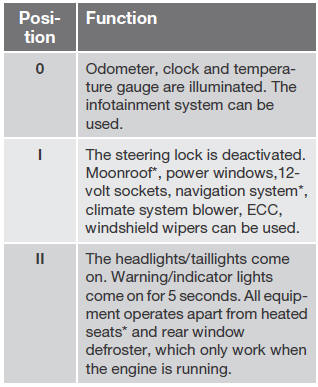
Ignition mode functions

The various ignition modes are accessed with the remote key in the ignition slot1.
See also:
Symbols in the main instrument panel
Indicator and warning symbols
Other information symbols
Information symbols in the center
console display
Information symbols in the ceiling
console
...
Tire age
Tires degrade over time, even when they are not being used. It is recommended
that tires generally be replaced after 6 years of normal service. Heat caused by
hot climates, frequent high loading c ...
Random
This function plays the audio files on the external device in random order (shuffle).
This function can be activated/deactivated under:
Bluetooth menu - Random
Press the buttons on the center
c ...