
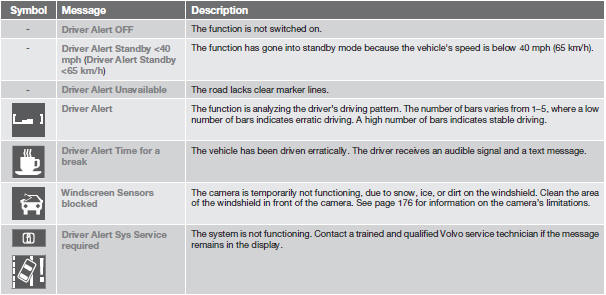
Symbols and messages in the display

See also:
Under the glove compartment
boxes.
1. Press the cover's lock and fold it up.
2. The fuses are accessible.
Positions-fuse box A
Positions-fuse box B
...
Traction control (TC)
This function is designed to help reduce wheel
spin by transferring power from a drive wheel
that begins to lose traction to the wheel on the
opposite side of the vehicle (on the same axle).
TC ...
Label information
1 Model plate: includes e.g., Vehicle Identification
Number (VIN), codes for color and
upholstery, etc. The model plate is located
on the rear side of the B-pillar (the pillar
between the front ...