
System

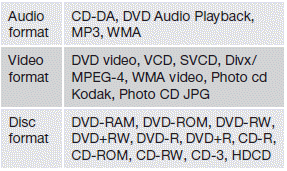
The formats supported by the system are:
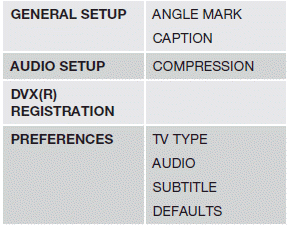
Advanced system settings
These settings can only be made when there is no disc in the CD/DVD player.
- Press MEDIA MENU.
See also:
Three-way catalytic converter
Three-way catalytic converter -
general information
• Keep your engine properly tuned. Certain
engine malfunctions, particularly involving
the electrical, fuel or distributor ignition
systems, ma ...
Folding down the rear seat backrests
The rear seat backrests can be folded down for additional loading space, see
page 92. ...
Locking
1. Switch off the engine (see page 114 for
details).
2. Remove the remote key from the ignition
slot.
3. Open the driver's door.
> A sound will be audible when the steering
wheel lock enga ...