
Installation

1. Lower the battery into the battery box.
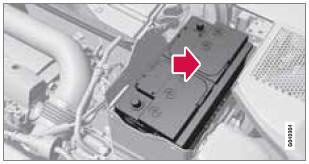
2. Move the battery inward and to the side until it reaches the rear edge of the box.
3. Tighten the clamp that secures the battery.
4. Connect the ventilation hose.
> Be sure that it is correctly connected to the battery and the vent in the vehicle's body.
5. Connect the red positive cable.
6. Connect the black negative cable.
7. Press in the rear cover. (See Removal).
8. Reinstall the molding. (See Removal).
9. Reinstall the front cover and secure it with the clips. (See Removal).
See also:
Cleaning the upholstery
Fabric
Clean with soapy water or a detergent. For
more difficult spots caused by oil, ice cream,
shoe polish, grease, etc., use a clothing/fabric
stain remover. Consult your Volvo retailer.
Inter ...
Tire sealing system–overview
Speed limit sticker
On/Off switch
Electrical wire
Bottle holder (orange cover)
Protective hose cover
Air release knob
Hose
Bottle with sealing compound
Air pressure gauge
...
Overview
The V50 Sportswagon belongs to Volvo's versatile V-range, along with the
Volvo V70, and is produced at Volvo's plant in Ghent, Belgium alongside the V70
estate and S40 and S60 saloons. In the UK, ...