
Operation

Sport mode
The stability system is always activated and cannot be switched off.
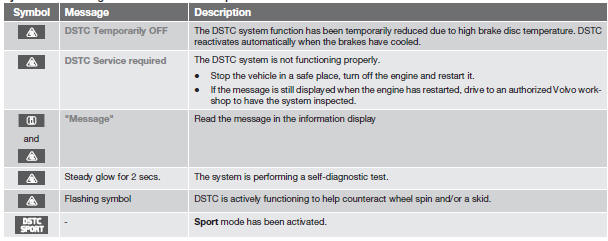
However, the driver can select Sport mode, which offers more active driving characteristics. In this mode, the engine management system monitors movement of the accelerator pedal and steering wheel for sportier driving by allowing more lateral movement of the rear wheels before DSTC is activated.
Under certain circumstances, such as when driving with snow chains, or driving in deep snow or loose sand, it may be advisable to temporarily use Sport mode for maximum tractive force.
If the driver releases pressure on the accelerator pedal, DSTC will also activate to help stabilize the vehicle.
To switch to Sport mode:
1. Press the My Car button in the center console control panel and select My S60 DSTC in the menu.
2. Unselect the symbol and leave the menu by pressing EXIT.
> This puts DSTC in Sport mode.
Sport mode remains active until the driver switches it off in the menu or until the engine is switched off. DSTC will return to normal mode when the engine is restarted.
Symbols and messages in the main instrument panel
 WARNING
The stability system is intended to help improve driving safety. It supplements, but can never replace, the driver's judgment and responsibility when operating the vehicle. Speed and driving style should always be adapted to traffic and road conditions.
See also:
Condensation on the inside of thewindows
Keeping the insides of the windows clean will
help reduce the amount of condensation that
forms on the windows. Use a commercial window
cleaning agent to clean the windows. ...
Infotainment system overview
Infotainment system overview
1 Sockets for external audio sources (AUX and USB)
2 Steering wheel keypad
3 7" display
4 Center console control panel ...
Image settings
Screen settings can be made for brightness,
contrast, tint and color.
Press on the remote control and
change
the setting under Image settings on the
screen. See also page 251 for additional ...