
Infotainment system overview

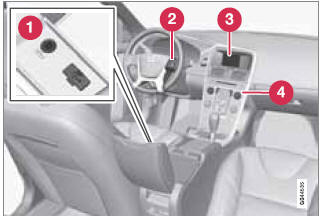 Infotainment system overview
1 Sockets for external audio sources (AUX and USB)
2 Steering wheel keypad
3 7" display
4 Center console control panel
See also:
Activating/deactivating
console activates the hands-free system. The
symbol in the display indicates that
the hands-free system is active.
A long press on the TEL button deactivates the hands-free system and disconnects ...
Design
In its overall shape, the all-new Volvo S60 is a four-door coupé - sportier
and more distinct than any previous Volvo.
The C-pillar of the all-new Volvo S60 stretches all the way to the tai ...
Removing a paired device
1. In Bluetooth mode, press OK/MENU.
2. Turn TUNE to Remove Bluetooth
device and press OK/MENU.
3. Select the device to be removed by turning
TUNE and confirm by pressing OK/
MENU.
> A que ...