
Seat with memory function

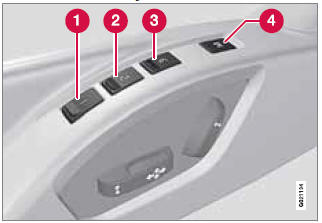
1 - Stored seat position
2 - Stored seat position
3 - Stored seat position
4 - Memory button
Programming the memory
Three different seating and door mirror positions can be stored in the driver seat's memory.
The following example explains how button (1) can be programmed. Buttons (2) and (3) are programmed in the same way.
To program (store) a seat position and door mirror position in button (1):
1. Move the seat (and door mirrors) to the desired position using the seat and mirror adjustment controls.
2. Press and hold down the memory button (4).
3. With the memory button depressed, press button (1) briefly to store the current position for the seat/mirrors.
To move the seat and mirrors to the position that they were in when a button was programmed:
Press and hold down button (1) until the seat and mirrors stop moving.
 NOTE
NOTE
As a safety precaution, the seat will stop automatically if the button is released before the seat has reached the preset position.
See also:
Center console controls
Center console controls for menu navigation
1 - Press MY CAR to access the My Car menus.
2 - Press OK/MENU to select a highlighted selection or to store a certain function
in the system's me ...
Refueling
The fuel tank is designed to accommodate
possible expansion of the fuel in hot weather.
See page 284 for fuel tank volume. Be aware
that the "usable" tank capacity will be somewhat
les ...
Getting started
Use the controls on the steering wheel keypad
and in the center console to access, navigate
and make selections in the hands-free system’s
menus. ...