
Front seats

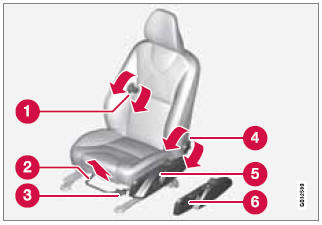
1 - Lumbar support: turn the control for firmer or softer lumbar support.
2 - Front-rear adjustment: lift the bar and move the seat to the position of your choice.
3 - Raise/lower front edge of seat cushion, pump up/down.
4 - Backrest tilt: turn the control to adjust the angle of the backrest.
5 - Raise/lower the seat, pump up/down. Control panel for power seat*.
 WARNING
- Do not adjust the seat while driving. The seat should be adjusted so that the brake pedal can be depressed fully. In addition, position the seat as far rearward as comfort and control allow.
- Check that the seat is securely locked into position after adjusting.
See also:
MY CAR
When the MY CAR symbol has been selected,
the following menu alternatives are displayed.
• My XC60
• Support systems
• Settings ...
Instrument overview
1 Headlights/Parking lights
2 Panel vents
3 Display
4 Temperature gauge
5 Odometer/Trip odometer/Cruise control
indicator
6 Speedometer
7 Turn signal indicator lights
8 Tachometer
9 Amb ...
From outside the vehicle
The remote key locks and unlocks all of the
doors and the tailgate.
Before the vehicle can be locked from the outside
with the remote key, the driver's door must
be closed. Any other door/tailg ...