
Operation

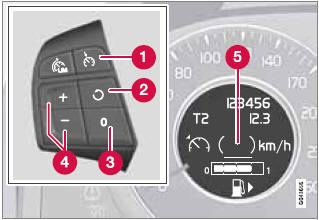
Steering wheel-mounted controls and display
1 Standby mode
2 Resume set speed
3 Deactivating
4 Activate/set speed
5 Set speed indicator (parentheses indicate standby mode)
See also:
Vanity mirror lighting
Removing the mirror glass
1. Insert a screwdriver underneath the lower
edge, in the center, turn and carefully pry
up the lug on the edge.
2. Carefully detach and lift out the entire mirror
...
Severe strain on the brake system
The brakes will be subject to severe strain when driving in mountains or hilly
areas, or when towing a trailer. Vehicle speed is usually slower, which means that
the cooling of the brakes is less ...
Overview
The smallest yet most expressively designed of all Volvos, the C30 has a
radical and refreshing appearance. Its unique styling creates its distinct
personality whilst closely aligning it to the all- ...